


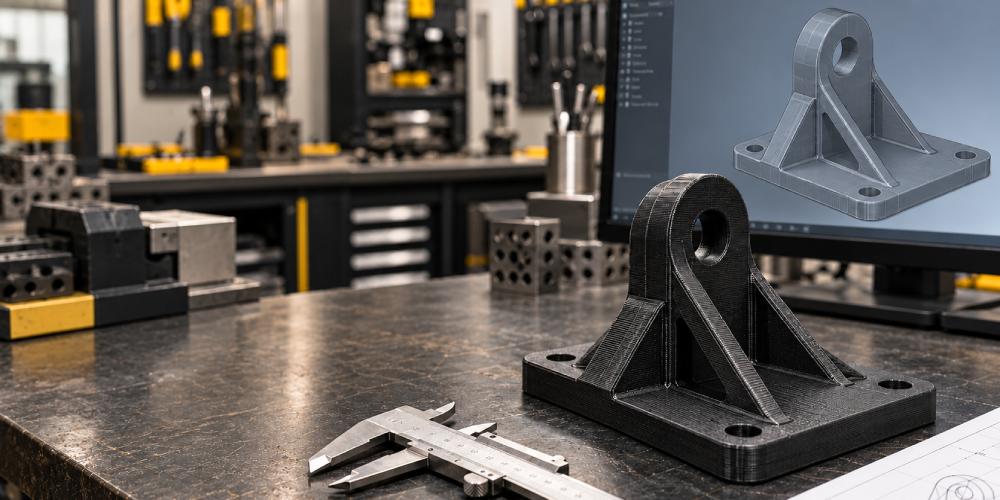
A component can look perfect in CAD but still be difficult to print or unsuitable for its intended use. Thin walls, incorrect clearances and poor build orientation can affect both manufacturing quality and performance.
Understanding how to design parts for 3D printing helps engineers address these issues early. By considering the material, printing process and functional requirements together, you can develop parts that are easier to manufacture, assemble and test.
This guide covers the main design considerations for functional polymer and composite components.
What Is Design for Additive Manufacturing?
Design for additive manufacturing, or DfAM, means developing components around the capabilities and limitations of the selected 3D printing process.
Rather than simply copying a machined part, engineers can reconsider its geometry, combine features and simplify assemblies. The design must still account for printability, finishing and operating conditions.
1. Start with the Part’s Function
Before creating detailed geometry, define what the component needs to do.
Consider:
- Loads: Will it experience tension, bending, compression or repeated impacts?
- Environment: Will it encounter heat, moisture or chemicals?
- Assembly: How will it connect to other components?
- Accuracy: Which dimensions and surfaces are critical?
- Service life: Is it a temporary prototype or a repeatedly used tool?
For example, a sensor bracket may require accurate positioning and stiffness, while an assembly fixture may need repeatable location and durable contact surfaces.
Clear requirements make material and design decisions more focused.
2. Choose the Printing Process Early
Different printing technologies have different design requirements. Minimum feature sizes, support structures and finishing methods vary between processes.
Chemtron’s 3D printing services in Singapore include filament-based, composite, resin and metal printing options. Selecting the process before finalising your CAD model helps you design around the intended manufacturing method.
Confirm the following with your printing provider:
- Suitable materials for the application.
- Minimum wall thickness and feature sizes.
- Expected dimensional accuracy.
- Support and post-processing requirements.
Avoid applying the same design limits to every printer and material.
3. Plan Print Orientation Around the Loads
Build orientation affects more than appearance.
In extrusion-based polymer printing, mechanical properties can differ between the layer plane and the build direction. Review how forces travel through the component and avoid orientations that make critical loads pull adjacent layers apart where practical.
For continuous fibre reinforced components, orientation also determines where reinforcement can contribute effectively. Fibre placement should follow the relevant load paths within printable layers.
Compare possible orientations for strength, support requirements, surface quality and finishing access before choosing one.
4. Use Wall Thickness That Suits the Application
The thinnest printable wall is not necessarily strong enough for practical use.
Start with the manufacturer’s process-specific guidance, then consider the wall’s height, unsupported length and loading. Supported and unsupported features may have different minimum requirements.
Check whether the design needs:
- More material around mounting points.
- Local reinforcement near loaded areas.
- Protection for thin features during assembly.
- Ribs to improve rigidity.
Focus material where it serves a clear purpose, then validate the design through suitable testing.
5. Allow for Tolerances and Assembly Clearance
Tolerance describes allowable dimensional variation. Clearance is the intentional gap between mating parts.
A pin and hole modelled at the same nominal diameter will not automatically produce a reliable fit. Decide whether the connection needs to slide freely, locate accurately or provide an interference fit.
Clearance depends on the printing process and surrounding geometry. Manufacturer guidance shows that nearby wall thickness can influence achievable gaps, so one value should not be used for every assembly.
For important connections, print a small test coupon with several candidate fits before manufacturing the full component.
Clearly identify critical dimensions, inspection datums and surfaces requiring secondary finishing.
6. Review Holes, Fasteners and Supports
Small holes may print inaccurately or close up, and their orientation can affect the result. Review important holes with the manufacturing provider before releasing the design.
For each connection, consider:
- Whether repeated assembly calls for an insert or captive nut.
- Whether a locating hole needs secondary finishing.
- Whether enough material surrounds the fastener.
- Whether installation tools can reach the connection.
Also check support access. Supports should be removable without damaging thin features or critical surfaces. Reorienting the part or adjusting an overhang may simplify finishing.
7. Review the CAD File and Print Settings
Before exporting, check units, overall dimensions, revision details and model integrity. Keep the editable CAD file available alongside the format requested by your provider.
Include a drawing or specification for requirements that the model cannot communicate, such as tolerances, material, surface finish and inspection needs.
Review the sliced preview for missing thin features, inaccessible supports and internal geometry. For reinforced parts, inspect the actual fibre paths. Wall thickness and reinforcement must be considered together because thicker walls reduce the space available for fibre routing.
Record the approved print settings with the CAD revision to support repeatable production.
8. Test Before Approving the Part
A successful print does not automatically confirm that the part meets its engineering requirements.
Your validation plan should include:
- Measuring critical dimensions.
- Checking assembly fit and tool access.
- Testing relevant loads and deflection.
- Evaluating performance in the intended environment.
- Recording results and making necessary revisions.
If a problem occurs, identify its cause before changing the design. An incorrect fit, unsuitable material and weak load path require different solutions.
Develop Your Next 3D Printed Part with Chemtron
Good design connects the CAD model with the realities of manufacturing, assembly and use.
Chemtron offers 3D CAD modelling and product design services alongside professional 3D printing services, supporting projects across Singapore, Malaysia and Indonesia.
Contact Chemtron with your CAD file, application details and critical requirements to discuss your next prototype, fixture or functional component.
Frequently Asked Questions
What is the minimum wall thickness for 3D printing?
There is no universal minimum. It depends on the printer, material, process and geometry. Follow the manufacturer’s guidance, then check whether the thickness meets the application’s structural requirements.
How much clearance should I leave between 3D printed parts?
Clearance depends on the required fit and manufacturing process. Confirm a starting value with your provider and test representative mating features when fit is critical.
Does print orientation affect strength?
Yes. Extrusion-based polymer and composite parts can have different properties in different directions. Choose orientation according to loading conditions and reinforcement requirements.
Can an existing CAD model be used for 3D printing?
Often, but it should first be reviewed for manufacturability. Thin features, connections, supports and dimensional requirements may need adjustments for the selected process.